
HMRC is responsible for securely transmitting vast amounts of personal and business data.
The sensitivity of this information is paramount and subject to stringent physical and digital security protocols. However, although rare, data breaches can happen.
To meet non-disclosure agreements, information maybe obfuscated. Views written are my own.

Background
In 2007 encrypted discs holding child benefit records were reported missing by the Chancellor of the Exchequer.
An immediate freeze was placed on data movements in to and out of HMRC whilst a technical solution was rapidly developed to manage the auditing, tracking and security of data transfers.
A decade on, the system needed to be decommissioned and replaced with a new digital service.
The challenge
Create a viable service that will enable the secure exchange of data between HMRC and external organisations, meeting the decommissioning schedule of legacy systems.
The Goals
- Understand the journeys and touch points that support our internal and external users to exchange data with HMRC
- Prototype a simple service that is compliant with accessibility standards
- Define our minimum viable product to support private beta objectives
Interaction design
Understanding the bigger picture and refining the detail:
- Engaging with our service users to understand context and user needs
- Sketching preliminary designs and drafting content for interfaces and user guidance
- Building responsive HMTL / CSS prototypes working to WCAG
- Testing journeys and iterating the interface to optimise user experience
- Working to GOV service standards and HMRC design patterns

Research & analysis
Building relationships and researching with a range of users to discover their needs, experiences and identify opportunities.

Standards & Assurance
Collaborating with the wider Standards and Assurance community providing pier reviews to develop new services across HMRC Digital that met the GOV Service Standard and contributing to HMRC's pattern library.

Design thinking
Defining and championing the design process to ensure features where driven by people's needs.

Discovery
We engaged stakeholders and users from the broader business community to understand the issues at hand.
Workshops were arranged around two lines of inquiry; firstly internally to gain awareness of technical constraints and policy requirements. Secondly, external sessions were setup with end users to understand what they needed and learn from their experiences of the current service.
Key issues identified by businesses
- The service is too expensive to setup
- It is complicated and use and takes too long to onboard new users
- Files are deleted before there is a chance download them
- Notifications are confusing

Opportunities
- Design a simpler, accessible system for internal and external users
- Eliminate the up-front cost and reduce burden on businesses to setup
- Simplify the technology stack to improve system robustness
- Streamline the registration process to reduce error paths and support calls
- Increase file availability window to improve download success rate and reduce support calls

Start with users
During discovery we identified groups of users involved with the exchange of data to and from HMRC.
These included:
- Organisations
- Other Government Departments (OGDs)
- Data Requestors
- Data Guardians
- System Administrators

Through research sessions across HMRC we started to develop an understanding of our user groups. Developing personas helped keep the team and wider stakeholders in tune with our users and their needs. Revisiting periodically with updated insights kept our personas representative and kept peoples needs in mind...
User needs
As a business user:
- I need to send documents to HMRC so that I can supply information when I’m asked for it
- I need to receive documents from HMRC so that I can keep updated with important information
- I need to send and receive documents securely so that I can keep my information safe
- I need to keep a recore of document movements so that I can prove what has been transfered
- I need to send and receive batches automatically so that I don’t have to do it by hand
Customer area
Transitioning to the new digital service had to be split into two phases with different business objectives. Each phase related to the staged decommissioning of the old platform.
The first aimed to create a new customer facing area to maintain business continuity for 200 existing businesses who would be migrated in batches; three priority features were needed:
- Document uploads
- Document download
- Document history
Prototyping
Paper prototypes were created for the initial rounds of testing. This method provided enough realism in a test situation to give us fast and meaningful feedback which was folded back into the design. However it had limitations when the upload file step was reached.
Begin with patterns
At this point the GOV prototype toolkit was used to build out a digital journey to test interactive features and content.
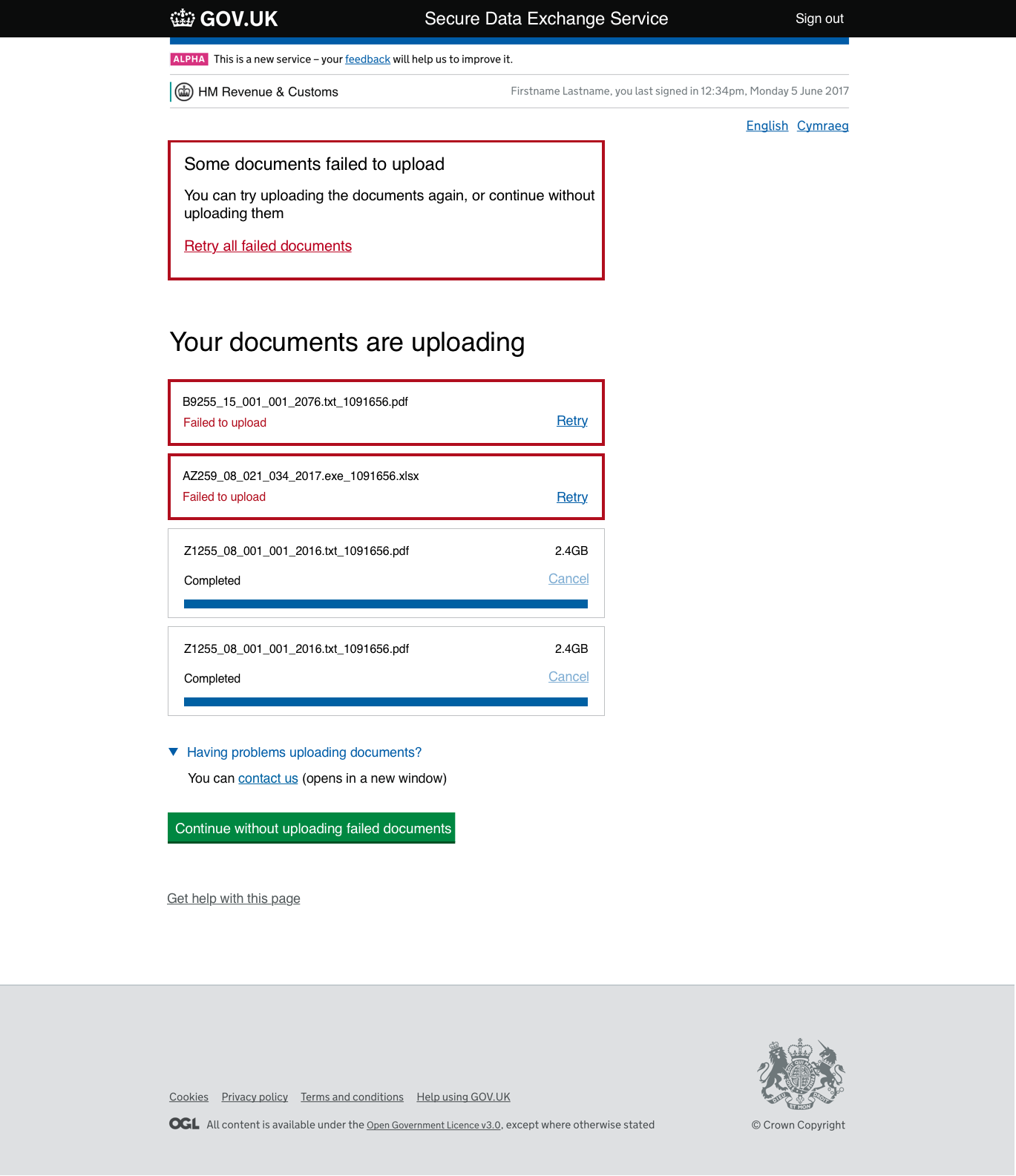
We started with the components and patterns available in the GOV design system, however the upload component did not test well, due to lack of feedback on the progress of larger files.
Progressive enhancements
Based on similar use cases identified on other GOV services, we designed and built an upload process which tested well and was subsequently adopted by other HMRC services.
We worked closely with the dev team to create an accessible journey using simple HTML elements and progressively enhanced with Javascript for the majority that had it enabled in their browsers.


Testing & iteration
There is no substitute for putting your designs in front of real users, it can be reassuring and humbling in equal measures.
We visited businesses throughout the country to put our prototype journeys through their paces. Test scripts were written to consistently measure usability and test the effectiveness of the designs.

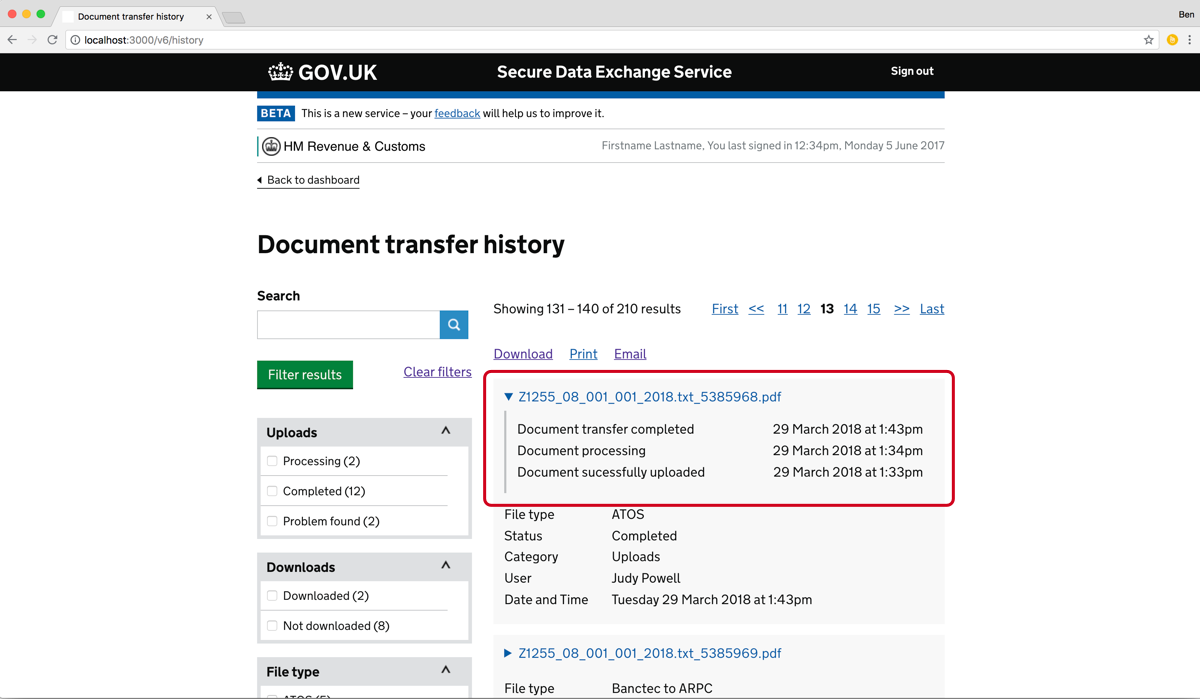
Insights gained through testing allowed us to further refine features and validate hypothesese.
Generally a minimum of 2 rounds of testing was conducted before we were confident to move stories into the backlog for development.

Accessibility = empowerment
We worked to inclusive design principles to ensure the developing service was:
- Perceivable - information needs to be visible to at least some of a user's senses
- Operable - the interface must be operated by everyone
- Understandable - keep content and interactions simple
- Robust - content must be technology agnostic
We tested early with users with a range of digital confidence levels and accessibility needs. This included testing with a range of assistive technology.
In addition to this, research labs and facilities at Government Digital Service (GDS) were used to put the prototype through it's paces.

Insights gained through testing allowed us to improve the content and tease out bugs which would otherwise have never been found.
This could be something as simple as reframing sentences to avoid negative language or contractions, to refining punctuation or experimenting with more effective HTML aria markup.
Markup was validated to WCAG 2.1 AA and the service was formally assessed at the Digital Accessibility Centre in Cardiff.
Continual Improvement
Monitoring and analysing service traffic gave useful insights into user behaviour and devices used. This information enabled us to help prioritise both specific design activities and make arguments for more strategic changes.

Being able to identify potential issues at different points of the journey is crucial to understand ways to improve service performance and overall outcomes.
Indicators such as high drop-offs or unusual repetitive behaviour can point toward evidence of a poor user experience and failure to complete a task.
Backed by evidence, guided specific experimentation with alternative interactions, content or more fundamental journey improvements.

Throughout our private BETA phase we used AB testing tools such as Optimizely. This allowed us to test design variants, analyse how they performed and iterate an improved service.

Internal systems
The second part of the project was to research, prototype and build a replacement for the incumbent back-end system which dealt with the request, approval and management of data movements.
Service hypothesis
As a direct result of the data mislaid in 2007, a process had been introduced which assessed the security arrangements around each data transfer before it was permitted to move into or out of HMRC. This process consisted of:
- A requestor asking permission to move data
- A Data Guardian reviewing and approving or rejecting the request
- If approved, the data movement being tracked and transfered securely
The request consisted of a lengthy application covering the what, why and how data was to be moved. This could be anything from emailing a spreadsheet to the decommissioning of a data centre and the hard drives needing to be couriered to a secure disposal location.
One prominent theme that emerged from research were users complaining of unnecessary duplication of information whilst completing a request to move data.
Identifying data sets which did, and didn't change often, enabled us to propose a simplified process. This principle was key in the solution outlined for approval with CTO.
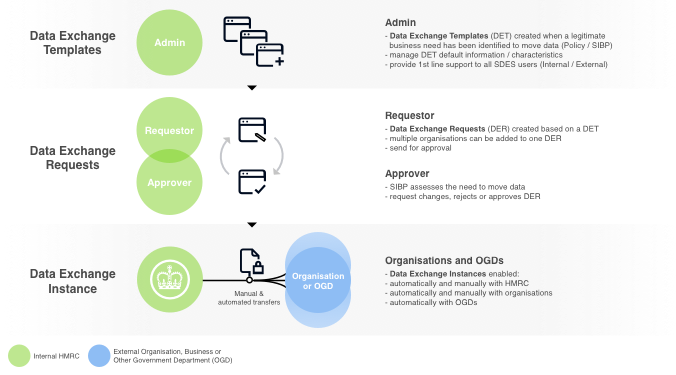
Data requests were analysed over a 12-month period, allowing us to identify common patterns. This helped build a clear picture of typical data movements, forming the foundation for a set of standardised data policies.
We proposed that new requests could be based on these policies, then customised by adding a smaller number of input fields.
By streamlining the process in this way, we anticipated that typical requests could be expedited significantly.
Getting out of the office
To test the theory we visited internal teams and external businesses across the country to observe and understand how data was moved in and out of HMRC.
We discovered a wide variation in how users moved and processed data — the picture was looking more complex than expected.
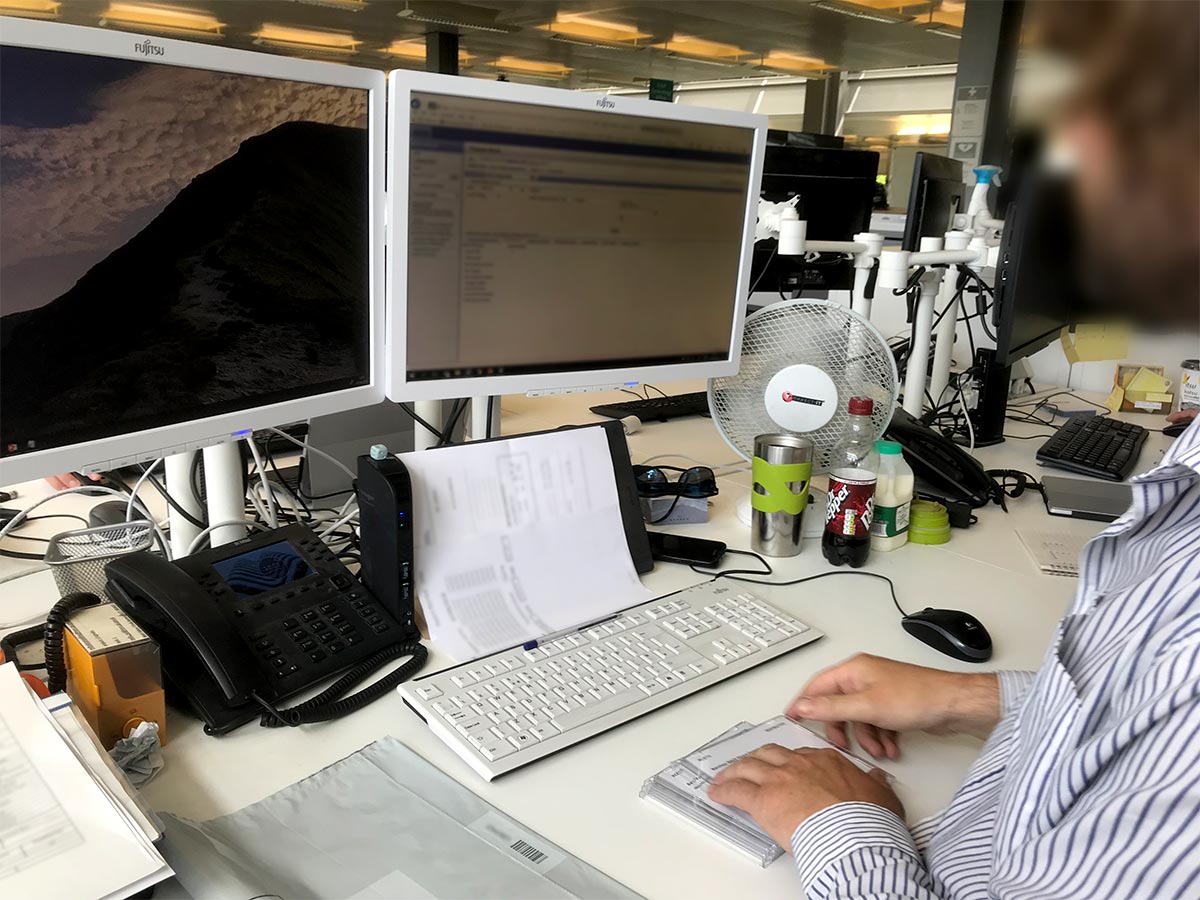
Observing the challenges encountered on a daily basis provided valuable insights into the complexity of the current process and the opportunity for simplification.
Understanding the issues
Workshops were arranged to deep dive into subject matter and understand needs of data Requestors and Approvers before moving forward.


Fail fast & often
Following our site visits and workshops, we realised the process detail was overwhelmingly complex!
To better understand the process, we mapped the entire workflow and interactions on the office wall, which helped visualise the end-to-end process. This approach allowed us to quickly experiment with ideas to simplify the journey and reduce cognitive load.

I developed a task model for each user group, identifying their goals and the key stages they navigated to achieve them. Using these models as a guide, we created a paper prototype in Google Slides. This approach allowed us to easily share ideas with remote teams and rapidly test different content, components, and journey variations.
After incorporating feedback from various teams, I proceeded to create HTML prototypes for more in-depth usability testing.

Usability testing
Contextual usability testing was not always possible. In this event we arranged sessions at user research labs within HMRC or at the Government Digital Service (GDS) in London.

Testing with people of different cognitive and physical abilities and different digital confidence levels, allowed us to develop a more inclusive service, both internally and externally.
Iteration & Refinement
Gaining insights from regular testing, we refined the request and approval journeys to ensure the design expedited the tasks at hand and met the needs of users.

Defining our MVP
With a clear picture of what good journeys looked like for different groups of users, we were able to advocate for the minimum viable product (MVP) specification. This process created healthy debate across the team, where arguments for user needs, business requirements and operational risks were balanced.

To enable us to meet our release date we had to reduce the tech effort for our first deployment. This was made possible by leveraging the existing service registration journey and was scheduled for development later in Public Beta.
To support the first release, I drafted guidance which tackled some difficult concepts during the phased transition from legacy systems.
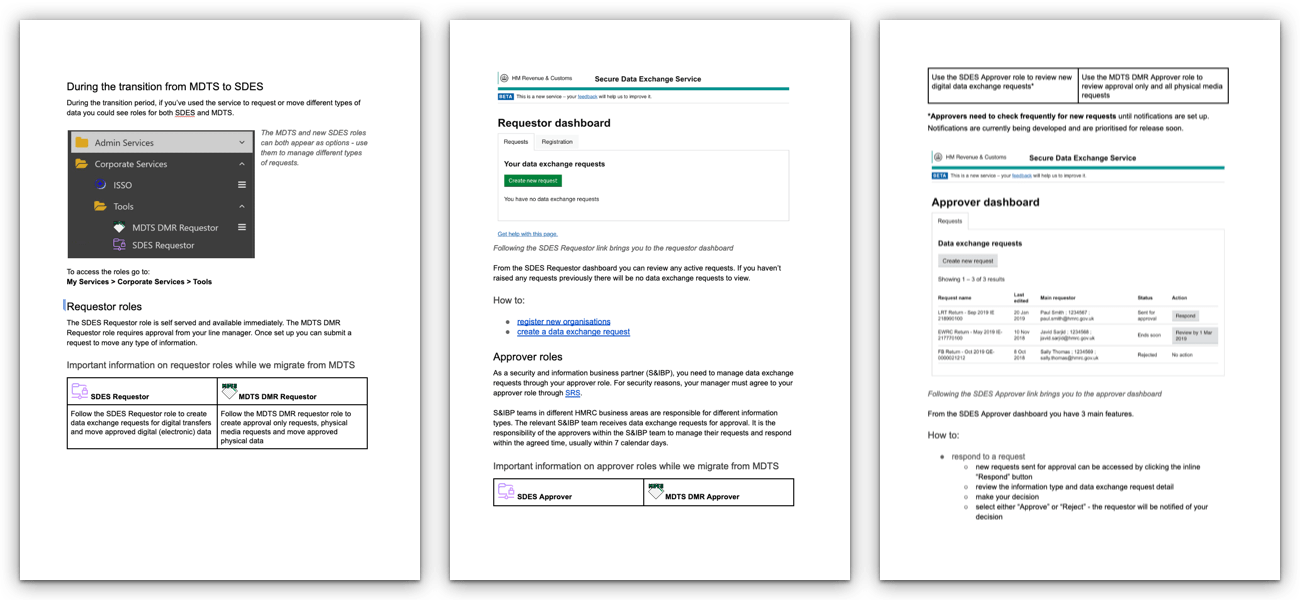
We tested our guidance with users groups across a mix of abilities and business areas. This was essential to ensure any gaps were identified and the correct messages were discussed and understood.
Admin time reduced by 80%
We delivered a streamlined public service that was free to set up and easier to use, helping businesses stay compliant with HMRC. Internally, we reduced the administrative time required to request and approve new data exchanges by an order of magnitude.
- Legacy systems decommissioned on time - By successfully prioritising the most valuable features that supported an end-to-end journey we transitioned away from proprietary technology on schedule.
- 200 businesses sucessfully onboarded - Our MVP allowed a pilot group of organisations to onboard and trial the service.
- Inclusive design - The service passed its Digital Accessibility Center (DAC) assessment, was WCAG2.1 AA compliant and met public sector accessibility regulations.